 GSketch
Free woodworking design software, from sketch to cut list
GSketch is free 3D design software for furniture and cabinets. You model the piece the way SketchUp users do (draw a face, push it into a board, type its exact size) and the model gives you the cut list, the plywood sheets to buy, a printable cut sheet and a scaled shop drawing. It runs in your browser or as a free desktop app on Mac, Windows and Linux.
Open GSketch free Download the desktop app
Draw it like a woodworker
- Real sizes as you draw. Type
3/4",4'6",24,36for a rectangle, or millimetres. Math works:3/4" * 2,1in + 5mm. - Each board a group, the way SketchUp woodworkers work, so parts don't stick together. Copies of a component stay shared: change one leg, all four change.
- Named sizes. Set
t = 3/4"andwidth = 36", size a shelf aswidth - 2*t, and when you switch to 18 mm sheet every part sized bytfollows. - A parts library (Components › Library): 2×4s, 2×6s, posts, boards, plywood sheets and a table leg at their real sizes, in wood. Right-click any group › Add to Library to keep your own.
- Joinery. Edit › Joinery › Cut Dado slots a shelf into a side a third of its thickness deep and grows the shelf into it, so the cut list has the real length.
- Wood you can see. Paint parts with wood colours and textures; parts painted a different wood list as a different stock.
Cabinets in a minute
Draw › Cabinet asks for width, height, depth and thickness, then doors, a drawer bank, shelves and a toe kick, and builds the sides, top, bottom, back, divider, shelves, doors, drawer fronts and drawer boxes as named groups. Drawer slide room and drawer box stock are yours to set. Entity Info › Edit Cabinet rebuilds it later with new sizes, in the same place.
What the model gives you
| Output | Where | What it's for |
|---|---|---|
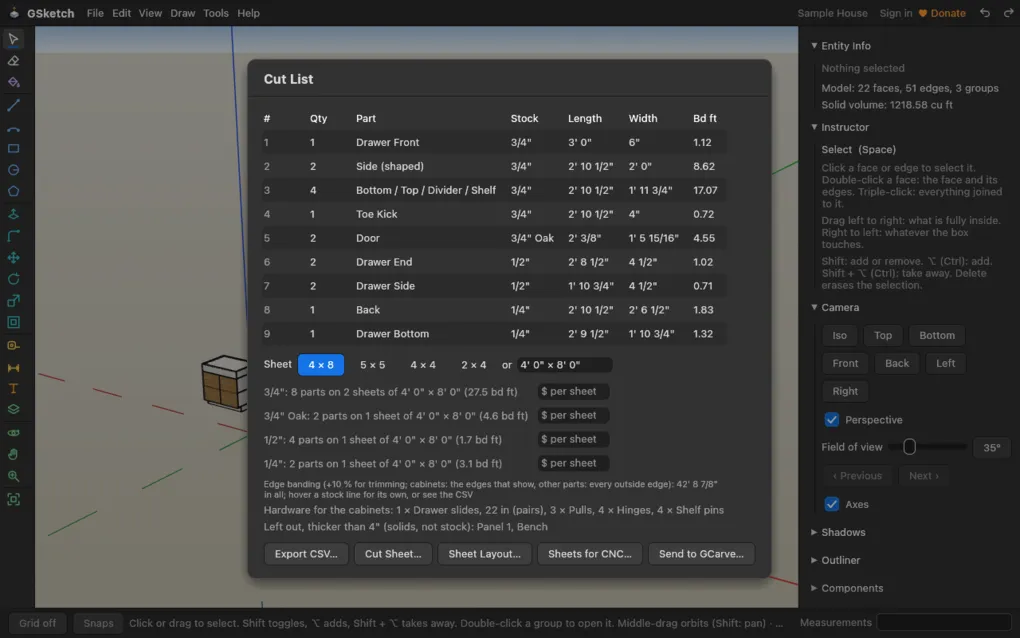
| Cut list | File › Cut List (CSV export) | Every part with quantity, stock, length, width and board feet |
| Sheets to buy, edge banding, hardware | Cut List | The shopping list: sheets per stock, banding length plus 10 %, hinges, slides, pulls, shelf pins |
| Cut sheet | Export Cut Sheet (SVG, printable) | Every part drawn to scale and numbered, for the bench |
| Sheet layout | Export Sheet Layout | Parts placed on plywood sheets with a kerf gap, grain kept along the sheet |
| Shop drawing | File › Export Scaled Drawing (PDF) | A plan or elevation at a standard scale with hidden lines removed, dimensions and notes |
| CNC sheets | Export Sheets for CNC (DXF / SVG), Send to GCarve | Nested sheets or flat panels for a router |
More on the cut list: cut list and sheet layout. Coming from SketchList 3D? GSketch as a free SketchList alternative.
From the model to the machine
- Table saw and hand tools: print the cut sheet and the sheet layout, and dimension the shop drawing.
- CNC router: File › Send to GCarve opens the flat parts in GCarve, free CNC software, one layer per stock thickness, to add toolpaths and write G-code. Nest by shape tucks curved and L-shaped parts into each other first.
- Laser cutter: File › Export Panels (SVG or DXF) gives every flat part as a closed outline; GBurn, free laser software, opens it to cut boxes, inlays and signs from thin sheet.
- 3D printer: File › Export STL for jigs, knobs and brackets.
Bring your old plans
Have furniture plans drawn in SketchUp? GSketch opens .skp files from every version, and their groups and components become parts in the cut list. It also imports DXF and SVG drawings. Coming from SketchUp for good: GSketch as a SketchUp alternative, or from SketchUp Make 2017.
Share what you build: the G Workshop community projects take GSketch models alongside GCarve and GBurn projects.
Woodworking.
What is the best free woodworking design software?
For furniture and cabinets, look for push/pull modelling, exact sizes in feet, inches and fractions, and a cut list straight from the model. GSketch does all three, free for commercial work, in a browser or as a desktop app.
Do I need to know SketchUp?
No, but it helps: GSketch works the way SketchUp does, with the same keys. The user manual (Help › User Manual) answers the common questions, and the cabinet builder makes a whole carcass from typed sizes.
Does it work in inches and fractions?
Yes. Type 4'6", 6 1/2" or 3/4" * 2 while you draw, or millimetres, or mix them (1in + 5mm). Each model keeps its own units.
Can it plan my plywood sheets?
Yes. Sheet Layout puts every part on 4 × 8, 5 × 5, 4 × 4, 2 × 4 or your own sheet size with a saw-kerf gap, keeps grained parts along the grain and counts the sheets for each stock.
Can I cut the parts on a CNC router or a laser?
Yes. File › Send to GCarve opens the flat parts in GCarve, free CNC software, one layer per thickness. File › Export Panels (SVG or DXF) takes them to GBurn, free laser software, or any CAM program.
Is it really free?
Yes, every tool, saving and export, for commercial work too. The desktop apps for Mac, Windows and Linux need no account; online needs a free account.
Open GSketch free Download for Mac, Windows, Linux
SketchUp is a trademark of Trimble Inc. GSketch is independent and not affiliated with Trimble. SketchUp details are from Trimble's published plans as of October 2026; tell us if something has changed via support.