 GSketch
A free cut list and sheet layout from your 3D model
Woodworkers have long drawn furniture in SketchUp and then bolted on a cut-list extension. In GSketch it is built in: model the piece the SketchUp way, then File › Cut List gives you every part, the sheets to buy, and the layout to cut.
Open GSketch free Download the desktop app
What you get
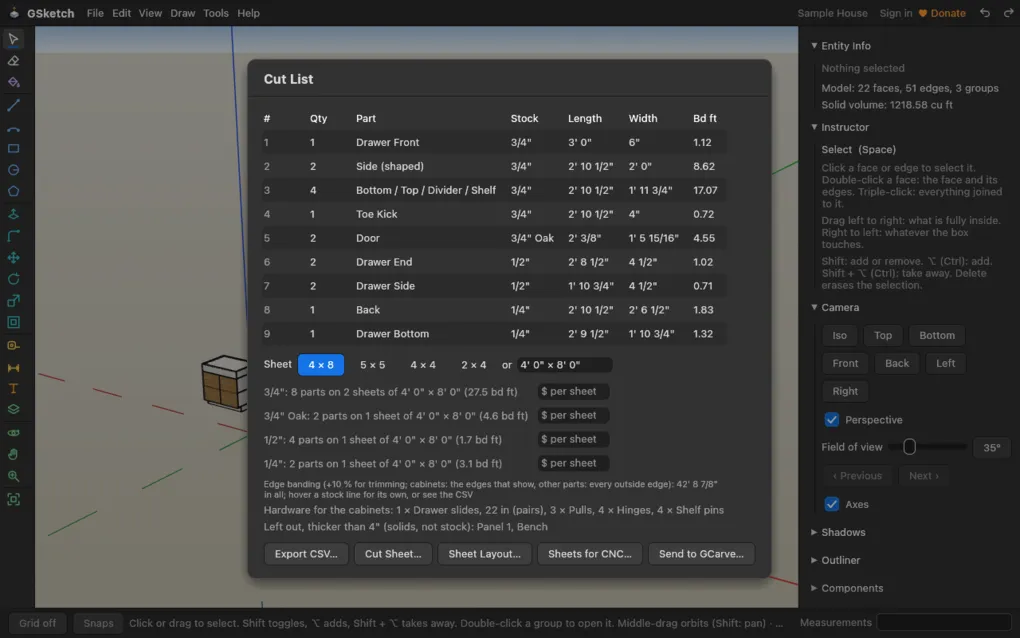
- Cut list: part numbers, quantities, stock (3/4", 3/4" Oak, 18 mm…), length, width and board feet. Parts painted a different wood are a different stock. Export it as CSV.
- Sheets to buy: from the real layout, per stock, with a price per sheet if you enter one.
- Edge banding: the length you need, plus 10 % for trimming. Cabinets band only the edges that show.
- Hardware: hinges, drawer slides (the longest standard length that fits), pulls and shelf pins for the cabinets.
- Cut sheet: a printable page with every part drawn to scale, numbered, with its size and your notes and dimensions on it.
- Sheet layout: the parts placed on plywood sheets, grain kept along the sheet, ready for the panel saw, or as a DXF / SVG for a CNC router.
A cabinet in a minute
Draw › Cabinet asks for width, height, depth and thickness, then doors, drawers, shelves and a toe kick. It builds the sides, top, bottom, back, divider, shelves, doors, drawer fronts and drawer boxes as named groups, ready for the cut list. Drawer slide room and drawer box stock are yours to set. Change your mind later: Entity Info › Edit Cabinet rebuilds it with the new sizes in the same place.
Components › Library has 2×4s, 2×6s, posts, boards and plywood sheets at their real sizes; right-click any group › Add to Library to keep your own parts for every model. Edit › Joinery › Cut Dado slots a shelf into a side and grows the shelf into it, so the cut list has the real length.
Sizes can be named: set t = 3/4" and width = 36", type width - 2*t for a shelf, and when a value changes every part sized by it follows.
To the router or the laser
File › Send to GCarve opens the flat parts in GCarve, our free CNC software, one layer per stock thickness, to add toolpaths and write G-code for your machine. Export Sheets for CNC writes the nested sheets as a DXF or SVG, a layer per sheet, for any CAM program.
Thin parts (3 mm plywood boxes, acrylic, signs) suit a laser better: File › Export Panels (SVG or DXF) writes every flat part as a closed outline, a layer per thickness, that GBurn, our free laser software, opens to cut.
Coming from SketchUp? See GSketch as a SketchUp alternative and how to open your .skp files. The whole workflow, from the first sketch to the shop drawing, is on free woodworking design software.
Cut lists.
Do I need an extension?
No. The Cut List, Cut Sheet, Sheet Layout and the cabinet builder are part of GSketch, online and on the desktop.
How does it know what a part is?
Every solid piece (best made a group, as in SketchUp) is a part. Its thickness is its depth across its biggest face; parts of the same size, thickness and material share a row. Solids thicker than 4 in are left out and named.
Can it nest parts on sheets?
Yes. Sheet Layout puts every part on 4 × 8, 5 × 5, 4 × 4, 2 × 4 or your own sheet size with a 1/4 in kerf gap, keeps grained parts along the grain, and counts the sheets per stock. Sheets for CNC writes the same layout as a DXF or SVG cut file; tick Nest by shape to tuck curved and L-shaped parts into each other for a CNC.
Can I open my SketchUp furniture models?
Yes. Open the .skp: its groups and components become parts in the cut list.
Does it work in metric?
Yes. Type sizes in mm, cm or m and switch the model's units; 18 mm sheets list as their own stock.
Open GSketch free Download for Mac, Windows, Linux
SketchUp is a trademark of Trimble Inc. GSketch is independent and not affiliated with Trimble. SketchUp details are from Trimble's published plans as of October 2026; tell us if something has changed via support.