 GSketch
A free SketchUp alternative that runs in your browser
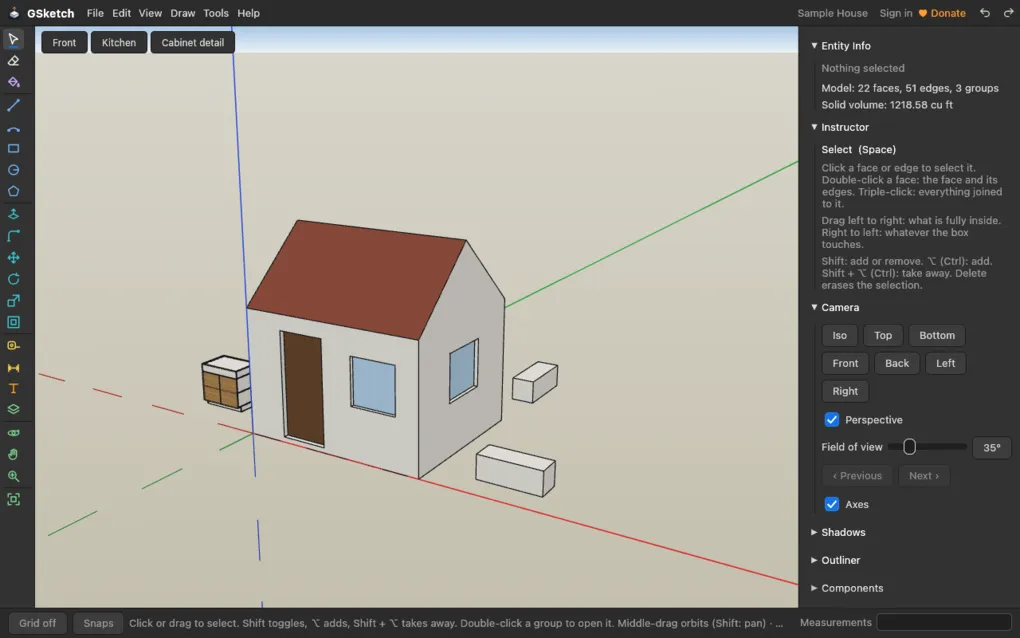
GSketch works the way SketchUp works: draw on faces, push and pull them into solids, let the cursor find corners and axes, and type exact sizes as you go. It is free, for commercial work too, it runs in any browser and on Mac, Windows and Linux, and it opens your .skp files.
Open GSketch free Download the desktop app
Side by side
| Feature | GSketch | SketchUp Free | SketchUp Pro |
|---|---|---|---|
| Price | Free, commercial use too | Free, for non-commercial use | Paid yearly subscription |
| Where it runs | Any browser, plus free Mac, Windows (7 to 11) and Linux apps | Browser only | Windows and Mac |
| Opens .skp files | Yes, every version | Yes | Yes |
| Push/Pull, Follow Me, Offset, inference | Yes | Yes | Yes |
| Solid tools (union, subtract, intersect, trim, split, outer shell) | Yes | No | Yes |
| Cut list and plywood sheet layout | Built in | No | Through extensions |
| Cabinet builder | Built in (doors, drawers, toe kick, rebuild with new sizes) | No | Through extensions |
| Named sizes | Yes: type width - 2*t anywhere; groups follow | No | Dynamic components |
| Terrain (Sandbox) and Match Photo | Yes | Yes | Yes |
| Several models open in tabs | Yes | No | Windows |
| Extensions, 3D Warehouse, LayOut | No | 3D Warehouse | Yes |
| Straight to a CNC router | Send to GCarve (free CAM), DXF / SVG panels | No | Through extensions |
The same shortcuts
Your hands already know GSketch. The tools sit on the keys SketchUp uses, and you type lengths into the Measurements box while you draw: 4'6", 6 1/2", 24,36 for a rectangle, 1in + 5mm, 12s for segments.
| Key | Tool |
|---|---|
| Space | Select |
| E | Eraser |
| L | Line |
| A | 2 Point Arc |
| R | Rectangle |
| C | Circle |
| Shift P | Polygon |
| P | Push/Pull |
| M | Move (⌥ / Ctrl copies, then type 5x for an array) |
| Q | Rotate |
| S | Scale |
| F | Offset |
| B | Paint Bucket |
| T | Tape Measure (guides) |
| D | Dimension |
| Shift T | Text |
| O | Orbit |
| H | Pan |
| Z | Zoom |
| Shift Z | Zoom Extents |
| K | Back Edges |
| Arrow keys | lock to the red, green or blue axis |
| ⌘K / Ctrl K | find any command |
Switching from SketchUp
- Open your model. File › Open your .skp (any version). Groups, components, colours, textures, glass, tags and scenes come with it. The file is read in your browser, not uploaded, unless you save it to your account.
- Keep working. Push, pull, move and paint as you always have. Double-click a group to open it; Esc to close it.
- Save as .gsk, or File › Export SketchUp (.skp) to take the model back into SketchUp (groups and components included), STL for 3D printing, or DXF / SVG panels for a CNC router.
What is not there (yet)
- Ruby extensions, the 3D Warehouse and LayOut.
- Textures projected or fitted to a photo come in with SketchUp's standard placement (ones moved by hand land where they were).
- Text notes in files from SketchUp 2021 and later stay behind (you can add your own in GSketch).
Missing something you use every day? Tell us through support: we read every one.
From the model to the workshop
SketchUp stops at the model. GSketch is built with two free sister apps, so what you draw can be made:
- A CNC router: File › Send to GCarve opens the flat panels in GCarve, one layer per stock thickness, to add toolpaths and write G-code.
- A laser cutter: File › Export Panels (SVG or DXF) writes every flat part as a closed outline that GBurn, our free laser software, opens to cut or engrave.
- A table saw: the cut list and sheet layout say what to buy and where each part comes from.
See also opening .skp files, Linux and Chromebook, for SketchUp Make 2017 users and woodworking design.
Good to know.
Is GSketch free?
Yes, for home and commercial work alike. Every tool, saving and export. Online it needs a free account, which keeps 3 models in the cloud; the desktop apps for Mac, Windows and Linux are free with no account.
Will my SketchUp models open?
Yes. GSketch opens .skp files from every SketchUp version with their groups, components, colours, textures, glass and tags. Dimensions come with it, and text notes from SketchUp 2020 and older.
Are the shortcuts the same?
Yes for the everyday tools: Space, L, R, C, P, M, Q, S, F, B, T, E, O, H, Z, and the arrow keys for axis locks. Alt, Ctrl, Cmd and Shift do what they do in SketchUp in the Select tool, Move, Push/Pull and the Paint Bucket.
Does it run extensions?
No. GSketch does not run SketchUp's Ruby extensions. Many popular ones are built in instead: a cut list, sheet layout, cabinet builder, 3D text and solid tools.
Is GSketch made by Trimble?
No. GSketch is an independent app made by Fill in the Blank, the studio behind GCarve.
Open GSketch free Download for Mac, Windows, Linux
SketchUp is a trademark of Trimble Inc. GSketch is independent and not affiliated with Trimble. SketchUp details are from Trimble's published plans as of October 2026; tell us if something has changed via support.