 GSketch
A free, current alternative to SketchUp Make 2017
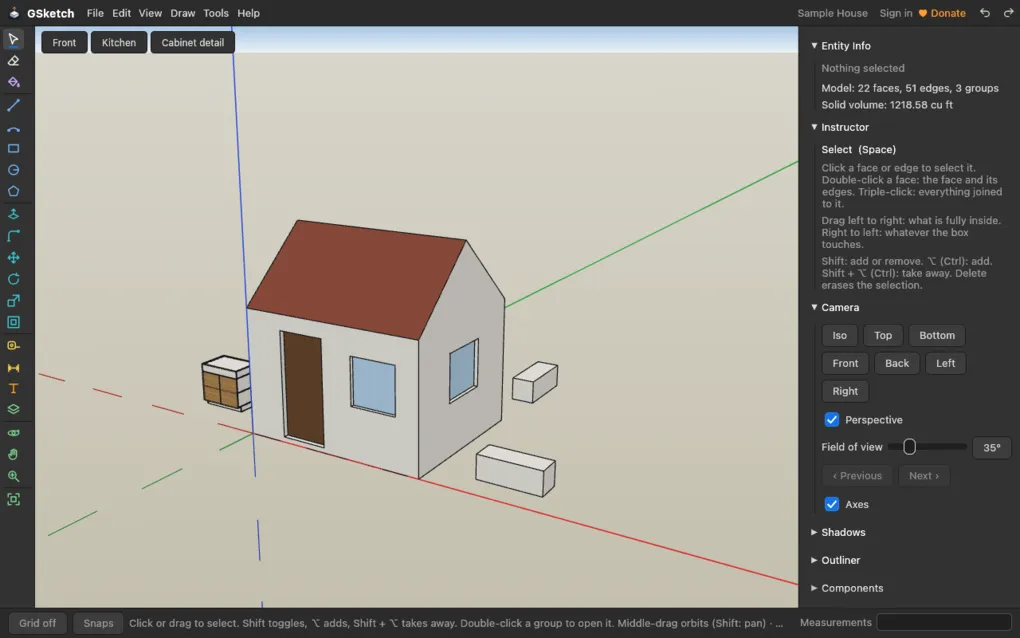
SketchUp Make 2017 was the last free desktop SketchUp, and it hasn't been updated since. GSketch is a free desktop modeller that works the same way (push/pull, inference, typed sizes, the same keys), keeps getting new versions, opens your Make files and saves .skp files that SketchUp Make 2017 opens.
Download GSketch free Or open it in your browser
Why people still look for SketchUp Make
Make was free, it ran on the desktop with no internet, and it allowed hobby use without a subscription. Its successor, SketchUp Free, runs only in a browser and is for non-commercial work; SketchUp Pro is a paid yearly subscription. If you want the Make experience on your own computer, free, without being stuck on a 2017 program, that's what GSketch is for.
Make 2017 next to GSketch
| Feature | SketchUp Make 2017 | GSketch |
|---|---|---|
| Price | Free (no longer updated) | Free, and still updated |
| Commercial use | No | Yes |
| Desktop app | Windows and Mac | Mac, Windows 7 to 11 (64 and 32-bit), Linux x86-64 and ARM |
| In a browser too | No | Yes, the same app |
| Opens Make files | Yes | Yes, and files from every later SketchUp |
| Saves .skp | Yes | Yes, in the 2017 format Make opens |
| Cut list, sheet layout, cabinet builder | Through extensions | Built in |
| Ruby extensions, 3D Warehouse | Yes | No |
What feels the same
- The tools and keys: Space Select, L Line, R Rectangle, C Circle, P Push/Pull, M Move (⌥ / Ctrl copies, then type
5xfor an array), Q Rotate, S Scale, F Offset, B Paint Bucket, T Tape Measure, E Eraser, O Orbit, H Pan, Z Zoom. The full list. - Inference: the cursor finds endpoints, midpoints, edges, faces and the red, green and blue axes; arrow keys lock an axis.
- The Measurements box: type
4'6",6 1/2"or24,36while you draw. - Groups and components, tags, scenes, section planes, X-ray, shadows, Follow Me, Intersect Faces, Sandbox-style terrain and Match Photo.
What's new compared with Make
- Solid Tools: union, subtract, intersect, trim, split and outer shell.
- Several models open in tabs (File › New Tab).
- Named sizes: set
t = 3/4"and typewidth - 2*tfor a shelf; changetand the parts follow. - Woodworking built in: a cut list, cut sheet and plywood sheet layout, a cabinet builder, a parts library of lumber and plywood at real sizes, and dado joints.
- Scaled drawings to PDF with hidden lines removed, dimensions, notes and a title line (Letter, Tabloid, A4, A3).
- Seven languages besides English, and accessibility settings: large text, high contrast, large snap marks.
Moving over from Make
- Download GSketch for your computer; the desktop app needs no account. On an old Windows 7 or 32-bit machine, pick that build from the download table.
- File › Open your Make .skp files, or drop them on the window. They are read on your computer.
- Keep working the way you did. Save as .gsk, or File › Export SketchUp (.skp) when a model goes back to someone still on Make.
You can keep SketchUp Make installed alongside; they don't interfere. Also on Linux? See GSketch for Linux and Ubuntu.
And then make it
File › Send to GCarve opens the flat panels in GCarve, our free CNC software, and File › Export Panels (SVG or DXF) takes them to GBurn, our free laser software.
From SketchUp Make.
Is SketchUp Make still available?
SketchUp Make 2017 was the last free desktop SketchUp, and it gets no updates. Today's free SketchUp is SketchUp Free, which runs in a browser and is for non-commercial use.
Will my SketchUp Make 2017 files open in GSketch?
Yes. GSketch opens .skp files from every SketchUp version, Make 2017 included, with their groups, components, colours, textures, glass, tags and scenes.
Can I send a model back to someone on SketchUp Make 2017?
Yes. File › Export SketchUp (.skp) writes the SketchUp 2017 format, which SketchUp Make 2017 and every later SketchUp open, with your groups and components nested and named.
Does GSketch run on the old computer I used for SketchUp Make?
Very likely. The Windows app runs on Windows 7 to 11, 64-bit and 32-bit, and it needs only OpenGL 2.0. There are also free apps for Mac and Linux, and the browser version.
Can I use it for paid work?
Yes. GSketch is free for commercial work too, on the desktop and online.
Do my Make extensions work?
No. GSketch does not run SketchUp's Ruby extensions. The ones woodworkers used most are built in instead: a cut list, sheet layout, cabinet builder and solid tools.
Open GSketch free Download for Mac, Windows, Linux
SketchUp is a trademark of Trimble Inc. GSketch is independent and not affiliated with Trimble. SketchUp details are from Trimble's published plans as of October 2026; tell us if something has changed via support.