 GSketch
Open SKP files without SketchUp, free and online
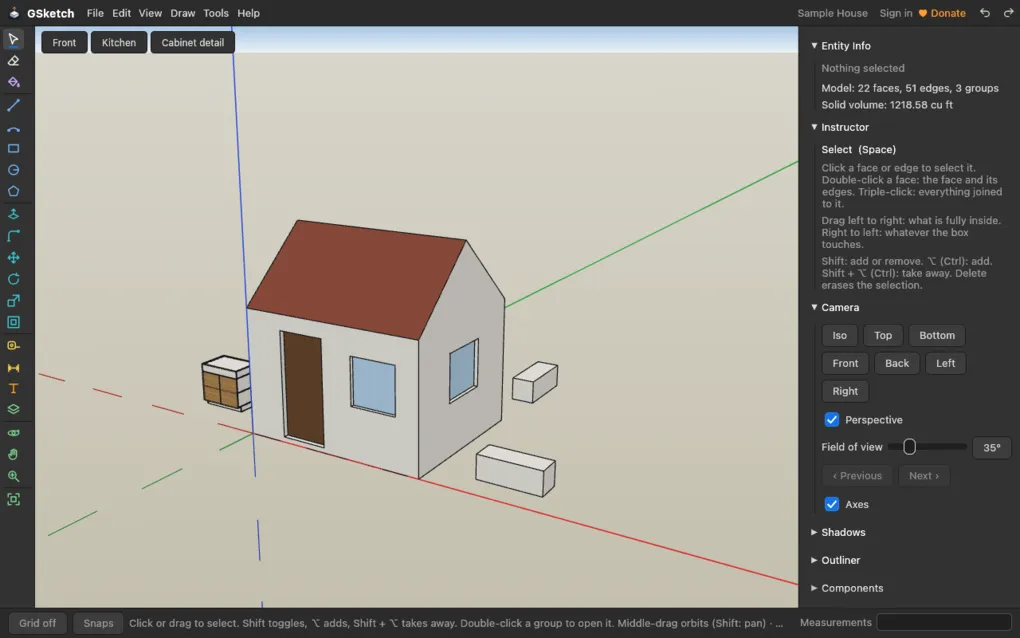
Got a .skp file and no SketchUp? GSketch opens it online in your browser (Chrome, Edge, Firefox, Safari, on a Mac, a PC, Linux or a Chromebook) or in the free desktop app. Not just a viewer: the model comes in ready to push, pull and change, and you can save it back as a .skp.
Open GSketch free Download the desktop app
Ways to open a .skp file
| Option | GSketch online | GSketch desktop | SketchUp Free |
|---|---|---|---|
| Price | Free | Free | Free |
| Commercial use | Yes | Yes | No |
| Runs on | Any browser: Mac, Windows, Linux, Chromebook | Mac, Windows 7 to 11, Linux (x86-64 and ARM) | Browser only |
| Account | Free G Workshop account | None | Trimble account |
| Edit the model | Yes | Yes | Yes |
| Save back as .skp | Yes (2017 format) | Yes (2017 format) | Yes |
| Cut list from the model | Yes | Yes | No |
What comes across
- Every version: SketchUp 3 to 2020 files, and the newer 2021+ format.
- Groups and components, nested as they were, with their names. Components stay shared: change one, all change.
- Colours, textures and glass: painted faces, tiled textures (brick, wood, tiles) and see-through materials.
- Tags (layers), with the ones hidden in the file still hidden.
- Scenes with their camera and hidden tags, from SketchUp 2013 on, as tabs along the top of the view.
- Dimensions, and text notes from SketchUp 2020 and older.
- Hidden and softened edges, hidden faces and groups, and guide lines.
How to open a .skp file online
- Open GSketch (a free account) or download the desktop app (no account).
- File › Open, or drop the .skp onto the window. File › Import brings one into the model you have open, as a component.
- Orbit with the middle button or ⌥ drag, Zoom Extents with Shift Z. Edit, then File › Save (a .gsk) or File › Export SketchUp (.skp) to hand it back to a SketchUp user.
What stays behind
- Text notes in files from SketchUp 2021 and later.
- Textures projected or fitted to a photo come in with the standard placement.
- Images placed in the model, styles, and extension data.
- Scenes that saved no camera.
GSketch also opens COLLADA (.dae), glTF / GLB, STL, OBJ, DXF and SVG, and prints scaled drawings to PDF. On Linux? See GSketch on Ubuntu, Debian and Fedora. Coming from SketchUp for good? See GSketch as a SketchUp alternative.
Then make it
A furniture or cabinet model opened from a .skp is ready for the cut list and sheet layout. File › Send to GCarve takes its flat panels to GCarve for a CNC router, and File › Export Panels (SVG or DXF) takes them to GBurn for a laser cutter.
Opening .skp files.
How do I open a SketchUp file without SketchUp?
Open gsketch.app/app in your browser (a free account) or the free desktop app (no account), then File › Open the .skp or drop it on the window. It opens ready to edit, and costs nothing.
Can I open a SketchUp file online?
Yes. GSketch runs in Chrome, Edge, Firefox and Safari, so you can open a .skp online on a Mac, a PC, Linux or a Chromebook with nothing to install. The file is read inside your browser.
Which SketchUp versions open?
Every version we have files from, from SketchUp 3 to the current 2021+ format. If one won't open, the app says why; send it through support and we'll look.
Is my file uploaded?
No. In the online app the file is read inside your browser. It only goes to our server if you choose to save it to your account.
Can I edit the model, not just view it?
Yes. It opens as a normal GSketch model: push and pull faces, move groups, change paint, then save it as a .gsk or export it.
Can I send it back to SketchUp?
Yes. File › Export SketchUp (.skp) writes a SketchUp file with your groups and components, nested and named as in GSketch. COLLADA (.dae) export works too. GSketch never writes over the .skp you opened.
Is there a size limit?
Files up to 100 MB. Big models open fine: our test car has 43,000 faces and 15 textures.
Open GSketch free Download for Mac, Windows, Linux
SketchUp is a trademark of Trimble Inc. GSketch is independent and not affiliated with Trimble. SketchUp details are from Trimble's published plans as of October 2026; tell us if something has changed via support.