 GSketch
SketchUp for Linux: a free native app for Ubuntu, Debian and Fedora
SketchUp's desktop app is for Windows and Mac only. GSketch works the SketchUp way (push/pull, inference, typed sizes, the same keys) and runs natively on Ubuntu, Debian, Fedora and other Linux, in any browser on a Chromebook, and on Mac and Windows too. It's free, and it opens and saves .skp files.
Download for Linux Open in the browser
Your options on Linux
| Option | What you get |
|---|---|
| SketchUp Pro desktop | No Linux version: Windows and Mac only. Wine is the usual workaround. |
| SketchUp Free | Runs in a Linux browser; non-commercial use only, no extensions. |
| GSketch for Linux | A native app, free for commercial work, no account, works offline, opens and saves .skp. |
| GSketch online | Any Linux browser or a Chromebook, with a free account. |
On Ubuntu, Debian, Fedora and other Linux
- A native app for x86-64 and ARM (aarch64, Raspberry Pi 4 and 5 too), not a Windows program under Wine. Unpack the .tar.gz and run it; a .desktop entry and icon come with it.
- Works offline, with your models as .gsk files. Signing in is optional and adds cloud models shared with the browser version.
- Light on the machine: OpenGL 2.0 is enough, so Mesa and older graphics cards are fine.
- A SpaceMouse flies the view.
- Keeps itself current: the app tells you when a new version is out.
Install on Ubuntu (or Debian, Fedora)
- Download GSketch-…-Linux-x86_64.tar.gz (or the aarch64 one on ARM, such as a Raspberry Pi 4 or 5).
- Unpack it:
tar xzf GSketch-*-Linux-x86_64.tar.gz. - Run
./gsketchfrom the folder, or./install.shto add GSketch to your applications menu.
Ubuntu 20.04, Debian 11, Fedora 32 and anything newer (Linux Mint, Pop!_OS, Raspberry Pi OS 64-bit) have what it needs. No Wine, no snap, no root.
On a Chromebook
Open gsketch.app/app in Chrome and sign in with a free account. Everything runs in the browser: drawing, push/pull, textures, shadows, the cut list, opening .skp files. No middle button? Swipe the trackpad to orbit, Shift-swipe to pan, pinch to zoom, or hold Alt (orbit) or Ctrl (pan) while you drag.
What it does
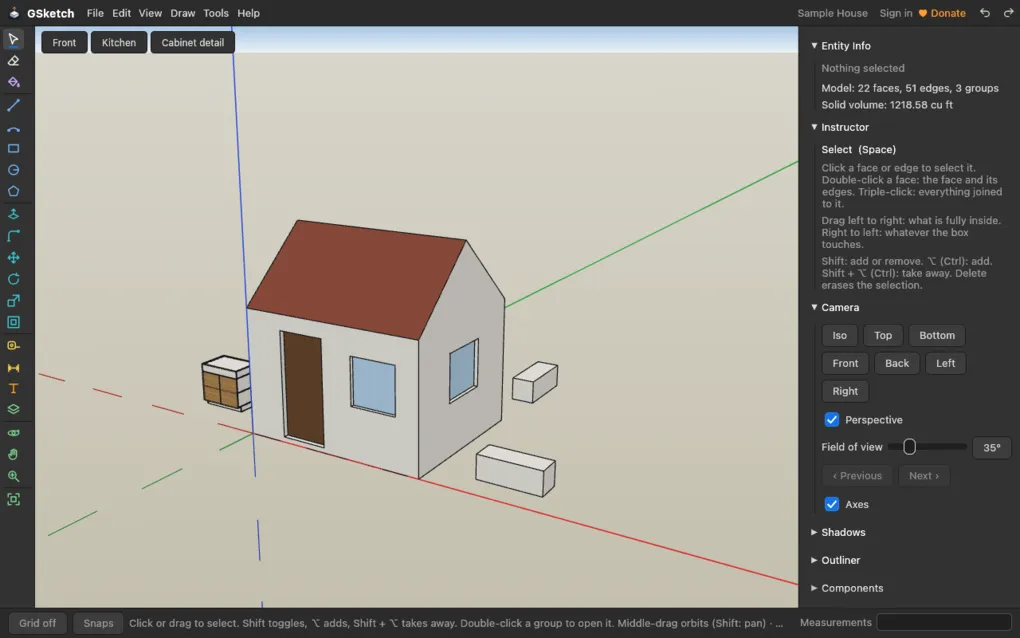
Lines, arcs, rectangles, circles and polygons; Push/Pull, Follow Me, Offset, Move, Rotate, Scale; groups and components; tags, scenes, section planes, shadows; dimensions and text; solid tools; terrain and Match Photo; a cabinet builder, a parts library and a cut list with plywood sheet layout; scaled drawings to PDF; .skp, COLLADA, glTF, STL, OBJ, DXF and SVG in; .skp, STL, COLLADA, DXF and SVG out; seven languages. See also how to open .skp files without SketchUp. More in GSketch as a SketchUp alternative.
The rest of the shop on Linux
The sister apps run on Linux too: GCarve turns the flat panels you send it (File › Send to GCarve) into G-code for a CNC router, and GBurn opens the SVG or DXF panels from File › Export Panels to drive a laser cutter. Both are free.
SketchUp on Linux.
Is there a Linux version of SketchUp?
Not from Trimble: SketchUp's desktop app is for Windows and Mac, and on Linux people run its web version or use Wine. GSketch has a native Linux app and works in any Linux browser.
Can I install SketchUp on Ubuntu?
Not natively: there is no SketchUp package for Ubuntu. GSketch is: download the Linux .tar.gz, unpack it and run ./install.sh to add it to the applications menu. It works the SketchUp way and opens your .skp files.
Which Linux systems does GSketch run on?
64-bit x86 and ARM (aarch64) Linux with glibc 2.30 or newer (Ubuntu 20.04, Debian 11, Fedora 32 and later, and distributions built on them such as Linux Mint, Pop!_OS and Raspberry Pi OS 64-bit) and OpenGL 2.0, which Mesa provides. It comes as a .tar.gz with a .desktop entry and icon.
Does it work on a Chromebook?
Yes, in Chrome, with a free account. A mouse with a middle button is easiest, but a trackpad works: swipe to orbit, pinch to zoom, or hold Alt and drag.
Can it open my .skp files on Linux?
Yes, from every SketchUp version, in the app or in the browser, and File › Export SketchUp (.skp) writes them back with groups and components.
Is it free?
Yes, commercial use included. The Linux app is free with no account; the browser version needs a free account.
Open GSketch free Download for Mac, Windows, Linux
SketchUp is a trademark of Trimble Inc. GSketch is independent and not affiliated with Trimble. SketchUp details are from Trimble's published plans as of October 2026; tell us if something has changed via support.