 GSketch
A free SketchList 3D alternative for cabinets and furniture
SketchList 3D is paid design software made for woodworkers: you build cabinets and furniture from boards and it gives you cut lists and board layouts. If you want the same result without paying for a licence, GSketch is free: model the piece SketchUp-style or with the cabinet builder, and the model gives you the cut list, the sheets to buy, a printable cut sheet and a shop drawing. It runs in your browser or as a free app on Mac, Windows and Linux.
Open GSketch free Download the desktop app
What you get, free
| You need | In GSketch |
|---|---|
| Cabinets fast | Draw › Cabinet: sides, top, bottom, back, shelves, doors, drawer fronts and drawer boxes from typed sizes; Edit Cabinet rebuilds it later |
| Furniture | Push/pull modelling with exact sizes in inches, fractions or millimetres; each board a group, shared components |
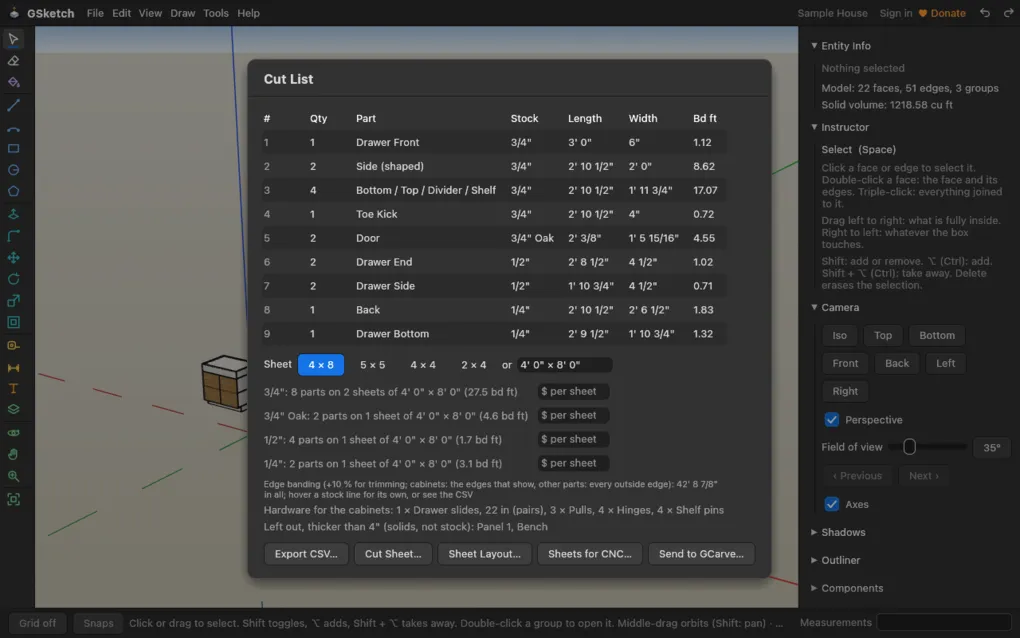
| Cut list | Every part with quantity, stock, length, width and board feet; CSV export |
| Shopping list | Sheets per stock, edge banding plus 10 %, hinges, slides, pulls, shelf pins |
| Sheet layout | Parts on 4 × 8, 5 × 5 or your own sheets, kerf gap, grain kept along the sheet |
| Drawings | Printable cut sheet (SVG) and a scaled shop drawing (PDF) with dimensions |
| CNC and laser | Send to GCarve, or export the sheets and panels as DXF / SVG |
| Price | Free, for commercial work too |
Switching
- Open GSketch in your browser, or download it for Mac, Windows or Linux.
- Set your sheet thickness once (
t = 3/4") and size parts from it, so a change of stock updates every part. - Build the carcass with Draw › Cabinet, or model the piece board by board.
- Open File › Cut List and Sheet Layout, print the cut sheet, and cut, or send the panels to a CNC.
SketchList 3D designs don't open in GSketch; SketchUp .skp plans do (details). More on the workflow: free woodworking design software and cut list and sheet layout.
SketchList 3D is a trademark of its owner; GSketch is independent.
From SketchList.
Is there a free alternative to SketchList 3D?
Yes. GSketch is free woodworking design software: model cabinets and furniture with exact sizes, then get a cut list, the plywood sheets to buy, a sheet layout and a scaled shop drawing. It runs in your browser or on Mac, Windows and Linux.
Can GSketch open SketchList 3D files?
No. GSketch opens SketchUp .skp files, DXF and SVG. Rebuild a SketchList design with the cabinet builder, which makes a whole carcass from typed sizes.
Does GSketch make a cut list and sheet layout?
Yes. File › Cut List lists every part with stock, sizes and board feet, plus sheets per stock, edge banding and hardware. Sheet Layout places the parts on 4 × 8 or your own sheet size with a kerf gap, grain kept along the sheet.
Can I send the parts to a CNC?
Yes. File › Send to GCarve opens the flat parts in GCarve, free CNC software, or export the sheets as DXF or SVG for any CAM program or a laser.
Open GSketch free Download for Mac, Windows, Linux
SketchUp is a trademark of Trimble Inc. GSketch is independent and not affiliated with Trimble. SketchUp details are from Trimble's published plans as of October 2026; tell us if something has changed via support.